Fletching Table
The fletching table is a workstation for arrow crafting on Realm Striders. Right-click a placed fletching table to open the station GUI.
Live on Realm Striders
RealmStriders Fletching Table is installed on the live server. Place any fletching table block and right-click it (do not sneak).
GUI walkthrough
Right-click a placed fletching table to open the station. The window title reads Strider Fletching Table (vanilla-style lettering).
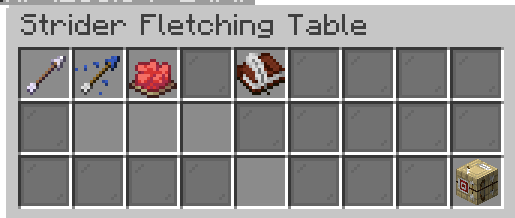
The top row has three icon tabs and a help book:
| Slot | What you see |
|---|---|
| Arrow icon | Craft tab — batch tier arrows |
| Tipped arrow icon | Tip tab — potion arrows |
| Red dye icon | Dye tab — colored trails |
| Book (center) | Short instructions for the active mode |
The active tab glows. Switching tabs returns items from the previous mode to your inventory, so craft materials will not stay in the tip slots.
Input slots are empty until you place items (cursor click, shift-click, drag, or hotbar swap work like a crafting table).
When the recipe is valid, a preview appears in the output slot (like a crafting table). Click or shift-click the output to craft and take the result in one step. This works on Craft, Tip, and Dye tabs.
The Fletch button (bottom-right) is a hint panel only — it shows a green “click the output slot” message when ready, or a red Missing: list when something is still needed. Clicking it does not craft.
Craft and tip results (success, failure, breath stored) appear as a chat message while the GUI is open (so text is not hidden behind the panel). When the station is closed, feedback uses the action bar instead.
Tip mode layout (bottom row): three flexible input slots → breath reserve counter → output preview → Fletch hints.
Modes
The station has three tabs at the top of the GUI:
| Tab | What it does |
|---|---|
| Craft | Batch-craft tier arrows from flint or metals |
| Tip | Apply potion effects to arrows (with dragon breath for splash/drinkable potions) |
| Dye | Add a colored flight trail and enchantment glint |
Craft — tier arrows
Place a material, feather, and stick in the craft slots, then click the output slot when the preview appears.
| Material | Yield (default) | PvP bonus | Mob bonus |
|---|---|---|---|
| Flint | 12 arrows | Normal | Normal |
| Iron ingot | 4 arrows | +5% | +15% |
| Gold ingot | 4 arrows | +8% | +20% |
| Diamond | 4 arrows | +12% | +35% |
| Netherite scrap | 4 arrows | +18% | +50% |
Flint batches at the fletching table yield more arrows than vanilla crafting-table recipes, which makes the station worth using for everyday ammo.
Tier arrows show a custom name and lore. Metal tiers apply separate bonuses: modest extra damage vs players (PvP) and stronger extra damage vs mobs and animals (PvE).
Tip — potion arrows
Add 8 arrows (or more) and a potion bottle in any of the three center input slots (order does not matter), then click the output slot when the preview appears.
- Lingering potions work like vanilla tipped-arrow crafting — no dragon breath required.
- Splash or drinkable potions need dragon breath charges stored in that table.
Dragon breath supply (furnace-style fuel)
Dragon breath works like furnace fuel: bottles placed in any Tip input slot convert immediately into stored charges on that table block — like coal becoming burn time inside a furnace.
- Open the Tip tab.
- Place dragon breath bottles in any of the three center input slots (alongside arrows and potions; order does not matter).
- Bottles convert immediately when placed; the reserve indicator updates right away and a chat message confirms how many charges were stored.
- Charges persist in
breath-charges.yml(per table block) until spent; each splash/drinkable tip craft spends charges (default: 1 charge per batch).
The reserve counter is shown on the dragon-breath indicator pane to the right of the input row.
Custom potions from other Realm Striders plugins (for example Arrow of Darkness) keep their effects when tipped here.
Vanilla crafting-table tipped-arrow recipes still work — the fletching table is a bonus station, not a gate.
Dye — colored trails
Add arrows and any dye, then click the output slot when the preview appears.
Dyed arrows gain:
- An enchantment glint in inventory
- A colored particle trail while flying
Works on normal arrows, tier arrows, and tipped arrows.
Tips
- Sneak while right-clicking a fletching table to use normal block interactions instead of opening the GUI.
- Fletcher villagers still use fletching tables as job sites — your custom station does not block villager AI.
- Each table remembers its own dragon breath reserve.
Staff
Plugin JAR: realmstriders-fletching-table.jar
Install script: scripts/install-fletching-table.ps1 (add -RestartMinecraft to load after upload)
Config: plugins/RealmStridersFletchingTable/config.yml (yields, pvp-multiplier and pve-multiplier per tier, breath costs)
Config push: scripts/push-fletching-config.ps1 (upload config without rebuilding the JAR)
Breath storage: plugins/RealmStridersFletchingTable/breath-charges.yml (per-block dragon breath reserves)