Strider Scarecrow
The Strider Scarecrow (in-game item name: Mod Scarecrow) is a craftable ward you place in the world to block spawns and repel specific mob types inside a radius. Craft it with any mob head for its look and first ward slot, add more heads through a six-slot GUI, and expand radius with ore ingots.
The held item uses the crafted head as its icon (creeper heads show the charged electric overlay when applicable) with an enchantment glint. Item lore lists your chosen base block and post (fence or end rod). No resource pack is required.
Crafting
Shaped crafting table recipe:
| Row | Ingredients |
|---|---|
| Top | Any mob head (center) — skeleton, zombie, creeper, piglin, wither skeleton, or dragon |
| Middle | Iron ingot, any fence or end rod, iron ingot |
| Bottom | Any full block (center) — not slabs |
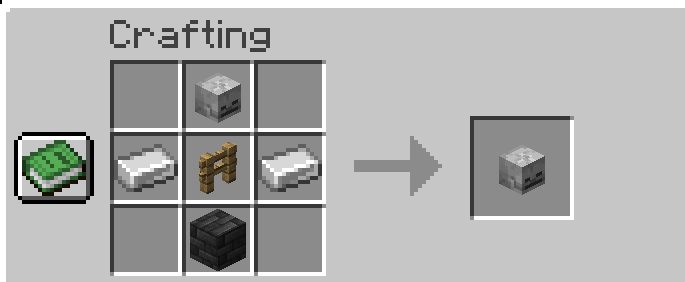
Example in the screenshot: skeleton skull, iron ingots, oak fence, and deepslate bricks → Mod Scarecrow with that head, base, and post. The recipe book may preview a plain mob head; the real output is a glinting scarecrow item that matches your ingredients.
Result: one Mod Scarecrow (base tier, 16-block radius).
The top slot must be a vanilla mob head (not an existing scarecrow item). Your ingredient choices set the scarecrow's look when placed:
| Ingredient | Effect |
|---|---|
| Mob head (top) | Top block and held item icon; auto-installs that head's ward slot (locked) |
| Full block (bottom) | Base block type (placed as-is at the anchor) |
| Fence or end rod (center) | Post between base and head |
Valid base blocks: any holdable full solid block (e.g. oak planks, stone, hay block, bricks).
Not valid in the bottom slot: slabs, fences, end rods, mob heads, or iron ingots — those belong in other slots or are rejected.
Example: creeper head / iron + oak fence + iron / oak planks → Mod Scarecrow.
The crafted head:
- Sets the scarecrow's head appearance (placed top block and held item)
- Auto-installs that head's ward slot (locked — cannot be removed later)
- Grants spawn block + repel for that mob type immediately (except dragon — see below)
Mob heads
| Head | Typical source | Ward effect |
|---|---|---|
| Skeleton skull | Skeleton killed by charged creeper | Blocks/repels skeletons and strays |
| Zombie head | Zombie killed by charged creeper | Blocks/repels zombies, husks, drowned |
| Creeper head | Creeper killed by charged creeper | Blocks/repels creepers (defuses primed creepers) |
| Piglin head | Piglin killed by charged creeper | Blocks/repels piglins, brutes, zombified piglins |
| Wither skeleton skull | Wither skeleton drop (Nether fortresses) | Blocks/repels wither skeletons |
| Dragon head | End ship loot | Soul-flame visual only — no ender dragon ward |
Placing
- Hold the scarecrow in your main hand.
- Right-click solid ground (grass, dirt, stone, etc.).
- Your chosen base block is placed at the anchor; the fence or end rod and crafted head stack above it. The block under the base is left intact.
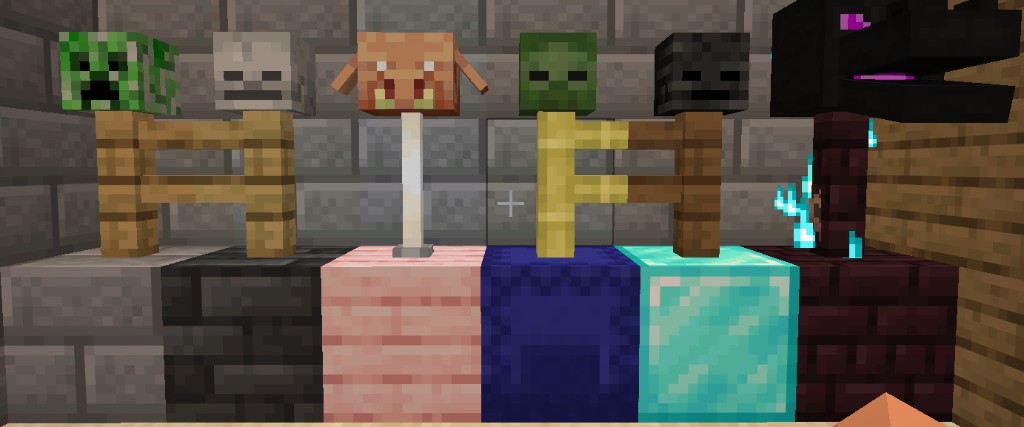
Each scarecrow keeps the base block, post, and head you crafted with. Left to right in the photo:
| Head | Base | Post |
|---|---|---|
| Creeper | Stone bricks | Oak fence |
| Skeleton | Deepslate bricks | Oak fence |
| Piglin | Cherry planks | End rod |
| Zombie | Blue wool | Bamboo fence |
| Wither skeleton | Diamond block | Oak fence |
| Dragon | Nether bricks | Nether brick fence (soul-flame particles) |
Right-clicking blocks like crafting tables or chests opens them normally. Sneak while right-clicking to place the scarecrow next to them.
The scarecrow item is consumed on placement. Placement plays a short mob-head-themed sound sequence (base, post, head, and finish) matching the head you crafted with.
Head slots (six-slot GUI)
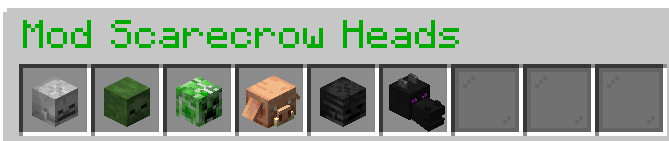
- Right-click the placed scarecrow to open the head inventory (a 9-slot chest row with 6 usable head slots and 3 filler slots on the right). Works with any item in hand except upgrade ores (hold the correct ore to upgrade instead).
- Only mob heads can be added to the slots — other items are rejected.
- Any of the six mob heads can go in any empty slot — slots are not tied to a specific mob type.
- You can install one head per mob type (no duplicate skeleton + skeleton).
- Installing a head adds that mob's ward (dragon adds soul-flame visuals only).
- The crafted head type is locked and cannot be removed (by type, not by slot position).
- Other installed heads can be removed by clicking the slot (head returns to you).
Ward boundary (toggle)
- Left-click the scarecrow with an empty hand to toggle the boundary visualization on or off for you only.
- Only the owner (or staff with
realmstriders.creeperward.others) can toggle the boundary on a placed scarecrow. - Particle rings show the ward radius at several heights when enabled.
- Action bar:
Scarecrow ward boundary: ONorOFF.
Upgrading range
Right-click the placed scarecrow while holding the next tier ore in your main hand. One ingot is consumed per upgrade.
| Tier | Upgrade material | Radius |
|---|---|---|
| Base | (crafted) | 16 blocks |
| Copper | Copper ingot | 24 blocks |
| Iron | Iron ingot | 32 blocks |
| Gold | Gold ingot | 40 blocks |
| Diamond | Diamond | 48 blocks |
| Netherite | Netherite ingot | 64 blocks |
Wrong ore or max tier shows a short message in the action bar.
Dragon head effect
When a dragon head is installed (crafted or added in a slot), the scarecrow emits blue soul-flame particles around the base, post, and head blocks. This is visual only — no fire damage and no effect on the ender dragon.
When the scarecrow's crafted (top) head is a dragon head, redstone power on any part of the assembly — base block, post, or head — triggers the vanilla dragon-head mouth animation.
Picking up
- Sneak + right-click any part of the scarecrow with an empty hand to pick it up cleanly (owner only).
- Or break the base, post, or head block — the full scarecrow is removed (owner only; others cannot break it for loot).
- You receive the scarecrow item with its tier, head, base, post, and locked slot.
- Removable installed heads (not the crafted locked head) drop as separate items.
- Re-placing keeps your upgrade tier on the item but only auto-installs the locked craft head until you add extras again in the GUI.
Repelling mobs
Warded mobs that walk into the zone from outside are pushed back out:
- They stop targeting players and path away from the scarecrow.
- Creepers inside have their fuse cancelled.
- Repel uses normal mob pathfinding.
What it does not do
- Does not kill mobs — only blocks spawns and makes them flee.
- Does not ward the ender dragon (dragon head is cosmetic soul flame).
- Does not stack radius bonuses when multiple scarecrows overlap.
- May not instantly eject mobs trapped in fully sealed rooms (spawn blocking still applies).
- Does not survive explosions — TNT, creepers, and other explosions destroy the scarecrow and drop its items (intentional).
Permissions
| Permission | Default | What it allows |
|---|---|---|
realmstriders.creeperward |
all players | Craft, place, upgrade, open GUI, and pick up your own scarecrows |
realmstriders.creeperward.others |
OP | Break, pick up, upgrade, or edit other players' scarecrows |
realmstriders.creeperward.admin |
OP | /creeperscarecrow give command |
Spawn blocking applies to natural spawns, spawners, patrols, raids, and reinforcements — not spawn eggs or /summon.
Staff
/creeperscarecrow [tier] [head] [player]— give a scarecrow (realmstriders.creeperward.admin). Example:/creeperscarecrow iron zombie_head The10thDr